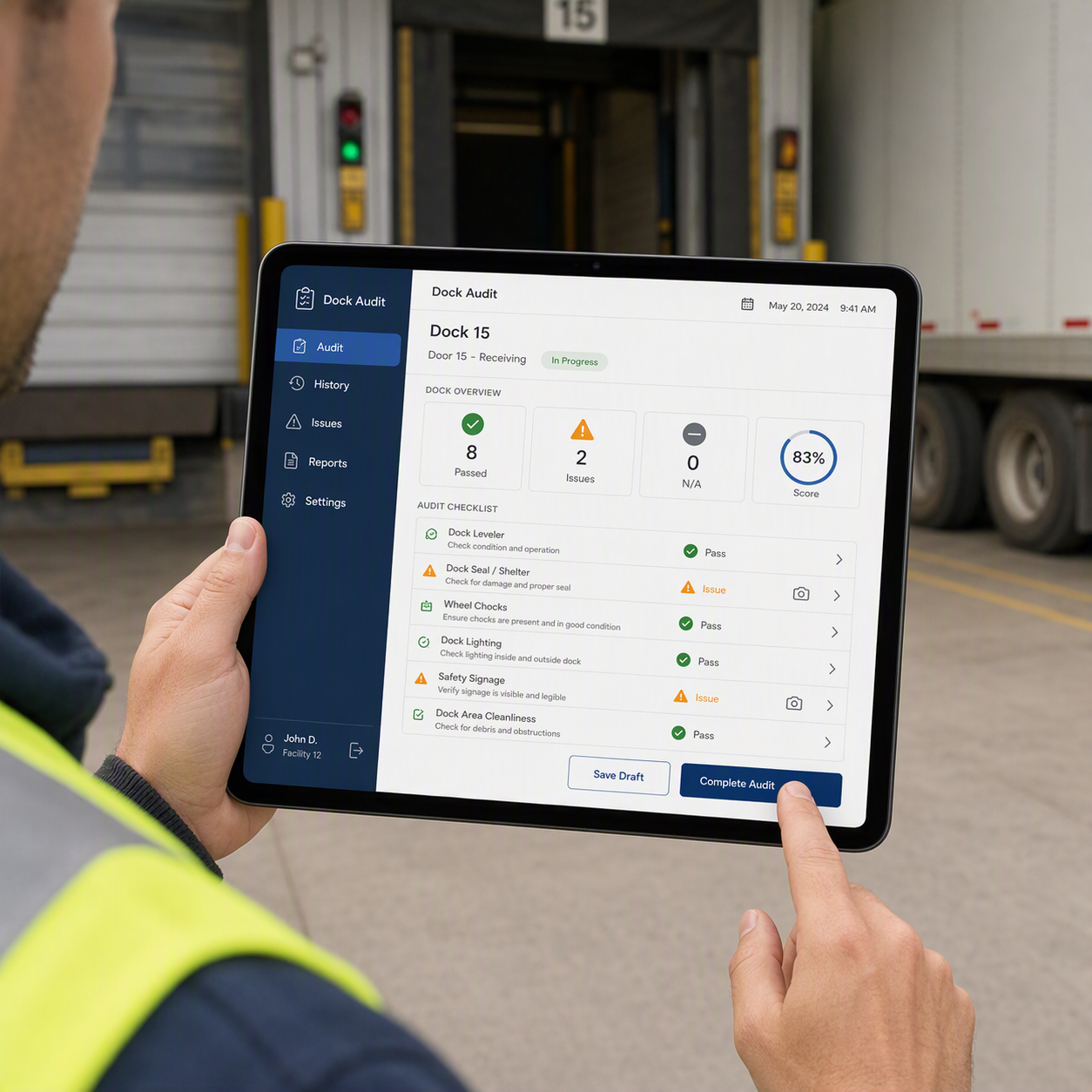
Dock Audit App for Manufacturing
A dock audit app for manufacturing helps teams inspect loading areas, spot hazards, record findings, and fix issues before they disrupt safe, smooth work. eAuditor Audits & Inspections gives manufacturing teams a practical way to move dock checks from paper forms to digital workflows.
A loading dock connects the factory, warehouse, and transport process. Trucks arrive, forklifts move materials, workers load goods, and finished products leave the site. Even a small problem with a dock door, ramp, barrier, floor, or vehicle can slow work or create a safety risk.
A dock audit app manufacturing workflow helps teams check these areas in a consistent way. With eAuditor, inspectors can use mobile checklists, record findings, add photos, report faults, and track corrective actions.
What Is a Dock Audit in Manufacturing?
A dock audit is a planned inspection of loading dock areas, equipment, work practices, and safety controls. The audit helps confirm that loading and unloading activities follow company procedures and safety requirements.
A typical dock audit can cover:
- Dock doors and loading areas
- Dock plates and ramps
- Forklifts and other material-handling equipment
- Pedestrian barriers
- Warning signs
- Lighting
- Housekeeping
- PPE
- Vehicle movement
- Load security
- Emergency equipment
- Employee training
- Hazard reporting
- Loading and unloading procedures
The aim is simple: find problems early and act on them quickly.
Why Manufacturing Sites Need Dock Audits
Manufacturing docks often stay busy throughout the day. Raw materials may arrive while finished goods leave the same facility.
That activity creates several points that need regular checks. A damaged ramp can affect loading. Poor lighting can make movement harder to control. Spills can create slip hazards. Untrained equipment operators can increase the risk of incidents.
Regular dock audits help teams:
- Find unsafe conditions
- Check dock equipment
- Improve housekeeping
- Verify safety procedures
- Record damaged equipment
- Confirm training requirements
- Track corrective actions
- Improve loading and unloading practices
- Maintain inspection records
- Support compliance and internal audits
eAuditor's manufacturing solution supports inspections, quality checks, equipment monitoring, compliance records, and mobile reporting across manufacturing operations.
How a Dock Audit App Helps Manufacturing Teams
Paper checklists can work, but they often make follow-up harder. Inspectors may need to carry forms, take separate photos, and later enter findings into another system.
A dock audit app manufacturing workflow keeps these steps together.
With eAuditor, teams can turn existing paper checklists or spreadsheets into digital inspection forms. The platform also supports custom templates and conditional logic, so teams can build checks around their own processes.
Inspectors can complete audits on mobile devices while they walk through the dock. They can record answers, add evidence, and flag issues as they find them.
Managers can then review inspection information and use reports and analytics to monitor trends.
Key Areas to Check During a Dock Audit
A useful dock audit should cover both safety and operational conditions.
Dock area: Check lighting, floor condition, housekeeping, access routes, warning signs, and pedestrian controls.
Dock equipment: Inspect dock doors, ramps, dock boards, barriers, and related equipment for damage or poor condition.
Vehicles: Check vehicle parking, movement controls, backup alarms, and load security.
Forklifts: Confirm that equipment receives regular inspections and that only trained operators use it.
Emergency readiness: Check fire extinguishers, emergency contacts, evacuation information, first aid supplies, and assembly points.
Work practices: Verify that workers follow safe loading and unloading procedures and use the required PPE.
The eAuditor Loading Dock Safety Inspection Checklist includes checks for lighting, pedestrian barriers, emergency plans, employee training, PPE, spills, dock doors, forklifts, ramps, load security, backup alarms, hazardous materials, fire extinguishers, and emergency drills.
eAuditor Loading Dock Safety Inspection Checklist
The Loading Dock Safety Inspection Checklist from the eAuditor library provides a useful starting point for manufacturing dock inspections.
The template covers three main areas:
- General safety measures
- Equipment and vehicle safety
- Emergency preparedness
For example, inspectors can check whether dock areas have adequate lighting, whether safety barriers protect pedestrians, and whether dock surfaces remain free from spills and debris.
The equipment section checks forklifts, operator training, parking areas, ramps, load security, backup alarms, vehicle maintenance, tool storage, and hazardous-material procedures.
The emergency section checks fire extinguishers, emergency drills, contact information, assembly points, and evacuation awareness.
Loading Dock Safety Inspection Checklist – eAuditor
Manufacturing Audit Checklist
Dock safety does not work in isolation. The dock is part of the wider manufacturing and material-handling process.
The Manufacturing Audit Checklist in the eAuditor library includes checks for safe equipment clearance, stable stored materials, tipping hazards, forklift operator training, battery charging areas, dock boards, warning devices, load limits, racks, lifting equipment, slings, pallets, and safe lifting practices.
This makes it useful when a manufacturing team wants to connect dock inspections with broader facility and material-handling audits.
Manufacturing Audit Checklist – eAuditor
Manufacturing Process Audit Checklist
A dock audit can also reveal problems that affect the manufacturing process itself.
The Manufacturing Process Audit Checklist checks safety, materials, tools, equipment, process controls, and documentation. Its questions include checks on PPE, machine guards, tools and materials, reported problems, standard work documents, and access to current instructions.
Using this type of checklist alongside a dock audit can help teams connect warehouse and loading activities with production controls.
Manufacturing Process Audit Checklist – eAuditor
First Article Inspection Checklist
Manufacturers that handle new products or components can also use the First Article Inspection Checklist from the eAuditor library.
The template checks purchase information, part numbers, drawings, software configurations, inspection procedures, test reports, manufacturing plans, material qualification records, packaging, acceptance criteria, and serialization.
This checklist is not a dock inspection template, but it can support a wider manufacturing audit program where incoming and outgoing product controls matter.
First Article Inspection Checklist – eAuditor
How to Perform a Dock Audit With eAuditor
A simple digital workflow can make dock inspections easier to manage.
1. Select or create a checklist
Start with the Loading Dock Safety Inspection Checklist. Customize it if your site has special equipment, traffic rules, or customer requirements.
2. Identify the dock
Record the dock number, location, inspection date, time, and inspector. This creates a clear record for each inspection.
3. Inspect the area
Walk through the dock and check housekeeping, lighting, barriers, signs, doors, ramps, and pedestrian routes.
4. Check equipment
Inspect forklifts, dock boards, ramps, alarms, and other equipment used during loading and unloading.
5. Record evidence
Add comments and photos when you find damage, unsafe conditions, or other issues. eAuditor supports evidence capture and digital reporting during inspections.
Flag non-conforming conditions instead of relying on memory or separate notes.
7. Assign corrective actions
Send the issue to the right person or team and track the required action.
8. Review the report
Generate and share an inspection report after the audit. eAuditor supports instant report generation and sharing after inspections.
Benefits of Using a Dock Audit App Manufacturing Workflow
A digital dock audit can improve more than record keeping.
Better consistency: Every inspector follows the same core questions.
Faster reporting: Teams can create reports without rewriting paper notes.
Clearer evidence: Photos and comments can stay with the inspection record.
Better follow-up: Corrective actions can be assigned and monitored.
Improved visibility: Managers can review inspection information and identify recurring issues.
Less paperwork: Mobile inspections reduce dependence on printed forms.
Stronger traceability: Digital records make it easier to review what happened, when it happened, and what action followed.
eAuditor stores mobile inspection and audit information in a cloud-based system and provides reporting and analytics for greater visibility.
Customize Dock Audits for Your Factory
Every manufacturing site has a different dock layout and workflow.
One plant may handle raw materials. Another may ship finished products all day. Some sites may use several forklifts, dock levelers, trailers, rail cars, or hazardous materials.
A good dock audit app manufacturing workflow should reflect those differences.
With eAuditor, teams can customize inspection forms and add logic to make forms easier to complete.
You can include checks such as:
- Dock number and location
- Trailer condition
- Wheel chocks or vehicle restraint systems
- Dock plate condition
- Dock door operation
- Floor condition
- Lighting
- Pedestrian routes
- Forklift checks
- Load stability
- PPE
- Emergency equipment
- Housekeeping
- Corrective actions
This approach keeps the audit useful without forcing every manufacturing site into the same checklist.
Build a Strong Corrective Action Process
Finding an issue is only the first step.
A damaged dock plate still needs repair. A blocked emergency route still needs clearing. A missing warning sign still needs replacement.
eAuditor helps teams capture issues and communicate them to the right people. Its issue-management workflow is designed to reduce under-reporting and support action on hazards, observations, and near misses.
A simple corrective action record should state:
- What went wrong
- Where it happened
- When it was found
- Who owns the action
- What action is required
- When the action is due
- Whether the action was completed
- Whether verification is needed
This turns a dock audit from a simple inspection into a continuous improvement process.
Use Dock Audits to Improve Manufacturing Performance
A dock audit should not become a box-ticking exercise.
Teams can review inspection data over time and look for repeated findings. Several damaged dock doors may point to a maintenance issue. Repeated housekeeping findings may show a need for clearer ownership. Frequent forklift-related findings may indicate a training or inspection gap.
eAuditor provides analytics and reporting that can help manufacturing teams monitor inspection information and identify areas that need attention.
The result is a more connected approach to safety, quality, maintenance, and compliance.
Why Choose eAuditor for Dock Audits?
eAuditor brings inspections, issues, corrective actions, reports, and analytics into one digital workflow.
Manufacturing teams can use mobile devices to conduct inspections on the go. Custom templates can match site-specific requirements. Photos and findings can support inspection evidence. Reports can be generated after completion, while dashboards provide broader visibility into inspection activity.
For teams looking to replace paper dock inspections, the dock audit app manufacturing approach offers a practical way to standardize checks and improve follow-up.
Explore eAuditor Audits & Inspections
Frequently Asked Questions
What is a dock audit in manufacturing?
A dock audit is a structured inspection of loading dock safety, equipment, work practices, housekeeping, and emergency controls. It helps manufacturing teams identify hazards and operational gaps.
What should a manufacturing dock audit include?
A dock audit can include dock doors, ramps, dock boards, lighting, pedestrian barriers, forklifts, vehicle controls, housekeeping, PPE, load security, warning signs, emergency equipment, and employee training.
Can eAuditor be used for loading dock inspections?
Yes. eAuditor provides a Loading Dock Safety Inspection Checklist that covers general safety, equipment and vehicle safety, and emergency preparedness.
Can I customize a dock audit checklist?
Yes. eAuditor allows teams to create and customize digital inspection templates. Its template builder can also use logic to make inspections easier to complete.
Can inspectors add photos during a dock audit?
Yes. eAuditor supports mobile inspections and allows teams to capture images and other evidence during inspections.
Can a dock audit identify corrective actions?
Yes. Inspectors can record findings and issues, while teams can use corrective-action workflows to follow up on problems.
Is a dock audit useful beyond safety?
Yes. Dock conditions can affect material flow, equipment use, warehouse practices, loading efficiency, and manufacturing operations. Combining dock checks with manufacturing audits can give teams a wider view of operational performance.
Where can I find an eAuditor dock inspection checklist?
The Loading Dock Safety Inspection Checklist is available in the eAuditor template library and covers key loading dock safety, equipment, vehicle, and emergency checks.
View the eAuditor Loading Dock Safety Inspection Checklist https://eauditor.app/2026/09/28/dock-audit-app-for-manufacturing/


Comments
Post a Comment