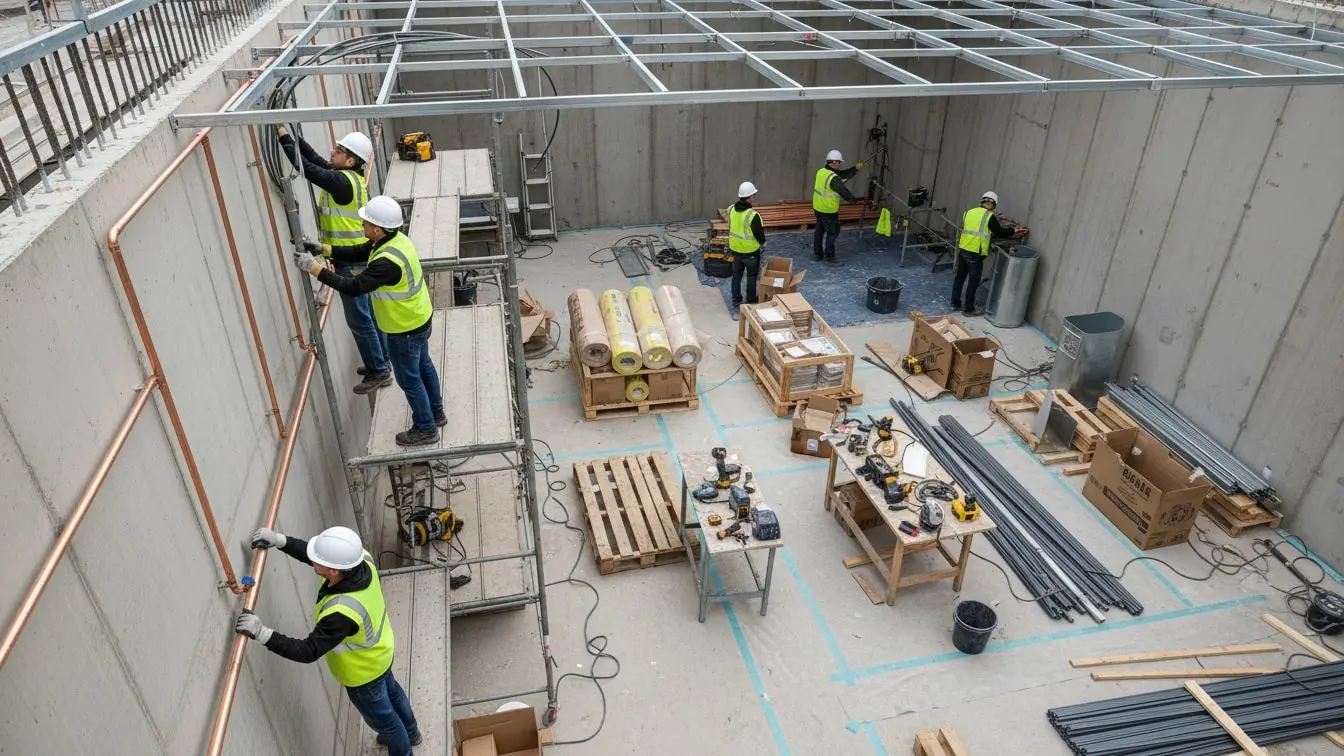
Site Visit Health and Safety Report: Complete Guide for Safer and More Effective Site Visits
A Site Visit Health and Safety Report gives teams a clear way to record what they see during a visit to a workplace, project, facility, or worksite. It helps inspectors document site conditions, identify hazards, review safety controls, record actions, and communicate important findings to managers and other stakeholders.
A site visit often involves more than simply walking around and checking a few items. Conditions can change quickly. Workers may perform new tasks. Contractors may arrive. Equipment may move. Weather can affect outdoor work. Temporary hazards can also appear without warning.
Therefore, a structured report helps make sure important information does not get missed.
A good Site Visit Health and Safety Report should explain what was inspected, what was observed, which issues were found, what action is needed, and whether further follow-up is required.
With eAuditor Audits & Inspections, teams can turn this process into a digital workflow. Inspectors can complete checklists on mobile devices, record observations while on site, capture photos, assign corrective actions, and generate professional reports after the visit. eAuditor supports mobile inspections, evidence capture, corrective actions, reporting, and analytics as part of its inspection platform.
What Is a Site Visit Health and Safety Report?
A Site Visit Health and Safety Report is a structured record of a health and safety inspection completed during a visit to a worksite.
The report can document:
- Site details.
- Visit date and time.
- Inspector information.
- Work activities.
- Site conditions.
- Worker safety.
- PPE.
- Equipment.
- Housekeeping.
- Access and traffic routes.
- Emergency arrangements.
- Fire safety.
- First aid.
- Work at height.
- Electrical safety.
- Hazardous substances.
- Environmental conditions.
- Safety documentation.
- Hazards and observations.
- Corrective actions.
- Follow-up requirements.
The exact content should match the site and the work being performed.
For example, a construction site may need detailed checks for scaffolding, excavations, lifting equipment, and fall protection. A warehouse may need more attention on traffic routes, racking, forklifts, loading areas, and manual handling.
Why Is a Site Visit Health and Safety Report Important?
A site visit gives an organization a chance to see actual working conditions.
However, observations have limited value if nobody records them clearly.
A structured report creates a record that managers can review and use for action.
It can help teams:
- Identify hazards.
- Record unsafe conditions.
- Check safety controls.
- Review worker practices.
- Document evidence.
- Assign corrective actions.
- Track outstanding issues.
- Improve communication.
- Support internal audits.
- Monitor repeated problems.
- Demonstrate that inspections took place.
- Improve safety performance.
Most importantly, the report should support action.
The goal is not to produce a document simply because a visit happened. The goal is to turn observations into useful information and, where needed, corrective action.
What Should a Site Visit Health and Safety Report Include?
A complete report should provide enough information for someone who was not present during the visit to understand what happened.
A practical report can include:
- Site or project name.
- Site address or location.
- Date and time.
- Inspector name.
- Client or contractor details.
- Work activities observed.
- Weather or environmental conditions where relevant.
- General site condition.
- Safety observations.
- Photos and evidence.
- Non-conformities.
- Immediate actions.
- Corrective actions.
- Responsible persons.
- Due dates.
- Follow-up requirements.
- Overall site status.
- Sign-off where required.
eAuditor's Field Report Template guidance recommends recording project information, site location, date and time, employee or inspector details, work completed, site observations, equipment, safety findings, environmental conditions, photographs, corrective actions, recommendations, and signatures.
Record Basic Site Information
Start every report with basic information.
Record the site name, project, location, visit date, visit time, inspector, and other relevant identification details.
This may seem simple, but it makes the report easier to trace later.
If a manager needs to review an issue several weeks later, clear identification helps them find the correct inspection quickly.
For organizations with several sites, consistent information is even more important. It allows teams to compare reports across locations without confusion.
Record the Purpose of the Site Visit
The report should explain why the visit took place.
For example, the visit may be:
- A routine safety inspection.
- A contractor inspection.
- A construction progress visit.
- A follow-up inspection.
- An incident follow-up.
- A pre-start inspection.
- A compliance review.
- A client visit.
- A maintenance inspection.
- A workplace safety walkthrough.
A clear purpose gives context to the findings.
It also helps managers understand whether the report covered the full site or only a specific activity.
Review Site Access and Security
The first physical checks should cover access to the site.
Inspectors should look at entrances, exits, site boundaries, pedestrian routes, vehicle routes, and restricted areas.
Check whether:
- Workers have a safe route to their work area.
- The site is secure.
- Unauthorized people can be prevented from entering.
- Public areas are protected.
- Traffic routes remain clear.
- Lighting is adequate.
- Safety signs are visible.
- Emergency routes remain accessible.
The eAuditor Checklist for Site Inspection includes safe worker routes, site security, public protection, traffic routes, lighting, and safety signs.
Check Housekeeping
Poor housekeeping can create simple but preventable hazards.
During the site visit, inspect floors, walkways, storage areas, workstations, and waste areas.
Look for:
- Trip hazards.
- Spills.
- Loose materials.
- Uncontrolled waste.
- Blocked walkways.
- Poor storage.
- Damaged surfaces.
- Obstructed exits.
A tidy site is easier to inspect and easier to work in.
However, housekeeping should not become a cosmetic exercise. The inspector should focus on conditions that can affect safety, access, movement, equipment, and emergency response.
Inspect Personal Protective Equipment
PPE should match the work being performed.
The report can document whether required PPE is available, suitable, maintained, and used correctly.
Depending on the work, this may include:
- Hard hats.
- Safety glasses.
- Gloves.
- Safety footwear.
- High-visibility clothing.
- Hearing protection.
- Respiratory protection.
- Fall protection equipment.
- Protective clothing.
The eAuditor Job Site Inspection Checklist includes checks for hard hats, safety glasses, fall protection, respirators, work boots, and other personal protective equipment.
If PPE is missing or used incorrectly, the report should describe the actual finding instead of simply stating “PPE issue.”
Review Worker Safety Practices
A site visit should look at what workers are actually doing.
Written procedures may exist, but inspectors also need to see whether workers follow them.
Observe:
- Work methods.
- Safe access.
- PPE use.
- Tool use.
- Manual handling.
- Work at height.
- Vehicle interaction.
- Emergency awareness.
- Hazard reporting.
Where appropriate, speak with workers.
Ask simple questions about the hazards they face and the controls they use.
This can help show whether workers understand the safety requirements or simply follow them without understanding the reason behind them.
Check Tools and Equipment
Tools and equipment can create hazards when they are damaged, poorly maintained, or used incorrectly.
The report should record the condition of relevant equipment.
Check:
- Tools.
- Machinery.
- Power cords.
- Electrical equipment.
- Machine guards.
- Ladders.
- Extension leads.
- Lifting equipment.
- Safety devices.
- Fire extinguishers.
The eAuditor Job Site Inspection Checklist includes checks for power cords, fire extinguishers, machine guards, ladders, extension ladders, step ladders, and tools.
If equipment is defective, the report should clearly state what was found and what action is required.
Review Work at Height
Work at height deserves specific attention because conditions can change during a project.
Inspectors should look for:
- Guardrails.
- Edge protection.
- Scaffolding.
- Work platforms.
- Fall arrest systems.
- Fall restraint.
- Safe access.
- Warning signs.
- Inspection records.
The report should also consider whether workers have the required training.
The eAuditor Job Site Inspection Checklist checks whether workers exposed to falls have documented training, whether fall protection equipment is inspected, whether equipment tags are legible, and whether required fall protection is being used.
Inspect Electrical Safety
Electrical equipment should be checked for visible defects and unsafe conditions.
Look for:
- Damaged cables.
- Damaged plugs.
- Unsafe connections.
- Exposed conductors.
- Poorly protected temporary supplies.
- Water near electrical equipment.
- Inappropriate extension leads.
- Missing inspection controls.
The eAuditor Checklist for Site Inspection includes checks on the identification and protection of existing services and the maintenance and inspection of electrical systems and equipment.
The exact electrical checks should reflect the equipment, work environment, and applicable requirements.
Check Traffic and Vehicle Movement
Vehicles and pedestrians may share the same worksite.
Therefore, the report should review how people and vehicles move through the area.
Check:
- Traffic routes.
- Pedestrian routes.
- Reversing areas.
- Vehicle visibility.
- Warning signs.
- Barriers.
- Lighting.
- Parking.
- Loading areas.
The eAuditor Checklist for Site Inspection checks traffic routes and vehicle visual or reversing aids where needed.
If vehicle and pedestrian routes cross, the report should identify the condition and any control that needs improvement.
Review Manual Handling
Manual handling can create strain and injury risks when workers move heavy, awkward, or unstable loads.
During the visit, check whether workers have suitable equipment and methods.
Review:
- Manual handling training.
- Load size.
- Load weight.
- Access routes.
- Storage height.
- Lifting aids.
- Team lifting arrangements.
The eAuditor Checklist for Site Inspection includes a check for worker instruction and training on safe manual handling. It also checks whether suitable lifting equipment is provided, certified, and inspected.
Check Lifting Equipment
Lifting equipment should be suitable for the task and maintained according to the organization's requirements.
The report can review:
- Equipment condition.
- Safe working capacity.
- Inspection status.
- Certification.
- Operator competence.
- Load stability.
- Lifting areas.
- Exclusion zones.
If an issue is found, record the equipment, location, condition, and action required.
Clear details make follow-up easier.
Inspect Excavations and Openings
Where excavations or openings exist, inspect the surrounding area carefully.
Check for:
- Barriers.
- Edge protection.
- Safe access.
- Warning signs.
- Falling-object risks.
- Water accumulation.
- Unstable ground.
- Nearby vehicle movement.
The eAuditor Job Site Inspection Checklist includes checks for caution tape or netting around holes and excavations, trip and fall hazards, and fall protection warnings.
The report should clearly identify any immediate risk that requires urgent attention.
Review Fire Safety
Fire safety should form part of a general site visit.
Check:
- Fire extinguishers.
- Fire alarms.
- Emergency exits.
- Evacuation routes.
- Fire signs.
- Combustible materials.
- Hot work controls.
- Emergency access.
Fire equipment should remain accessible.
Likewise, emergency routes should not become storage areas.
Check First Aid and Emergency Arrangements
Workers should know what to do if an incident occurs.
During the visit, check:
- First-aid facilities.
- Emergency contacts.
- Emergency routes.
- Muster points.
- Emergency signs.
- Communication methods.
- Worker awareness.
The eAuditor Checklist for Site Inspection asks whether first-aid facilities are available and whether workers know where they are.
A report should record both the physical availability of emergency resources and important gaps in worker awareness.
Review Welfare Facilities
Welfare facilities support worker health and basic workplace conditions.
Depending on the site, inspect:
- Toilets.
- Washing facilities.
- Drinking water.
- Rest areas.
- Canteen facilities.
- Changing areas.
- Cleanliness.
The eAuditor Checklist for Site Inspection includes checks for adequate and clean welfare facilities such as toilets and canteen areas.
If facilities are inadequate, record the problem clearly and assign an appropriate action.
Check Hazardous Substances
Where chemicals or other hazardous substances are used, the site visit should include relevant controls.
Review:
- Labels.
- Containers.
- Storage.
- Safety information.
- PPE.
- Spill controls.
- Ventilation.
- Worker awareness.
- Waste handling.
The inspector should focus on the substances actually present at the site rather than using a generic list that does not match the work.
Review Safety Documentation
A site visit should also consider the documents that support safe work.
Depending on the operation, this may include:
- Risk assessments.
- Method statements.
- Permits.
- Training records.
- Toolbox talks.
- Inspection records.
- Equipment certificates.
- Emergency procedures.
- Incident records.
The eAuditor Job Site Inspection Checklist includes safety materials, legal papers, safety meeting records, first-aid documentation, accident forms, and toolbox talks.
Documents should support actual site practices. A procedure on paper has limited value if workers do not understand or follow it.
Record Environmental Conditions
Environmental conditions can affect safety.
During the visit, record relevant conditions such as:
- Weather.
- Rain.
- Wind.
- Heat.
- Cold.
- Poor visibility.
- Dust.
- Noise.
- Standing water.
- Ground conditions.
This information can help explain why certain controls were required during the visit.
For outdoor work, environmental conditions can also change during the day. Therefore, inspectors should consider whether existing controls remain suitable.
Record Hazards Clearly
A good report explains what the inspector found.
Avoid vague statements such as:
“Unsafe.”
“Needs attention.”
“Bad housekeeping.”
Instead, explain the actual condition.
For example, a stronger finding would state that loose electrical cables were crossing a pedestrian route near the work area, creating a trip hazard.
The clearer the finding, the easier it becomes to decide what needs to change.
Capture Photos and Other Evidence
Photos can add useful context to a Site Visit Health and Safety Report.
Use them to document:
- Damaged equipment.
- Blocked access.
- Missing barriers.
- Poor storage.
- Unsafe conditions.
- PPE issues.
- Completed corrective actions.
Add a short note when needed.
eAuditor supports capturing photos and other evidence during digital inspections. Its platform also allows teams to record findings and use the information in professional reports.
Record Immediate Actions
Some findings need action before the site visit ends.
For example, an inspector may find a damaged ladder being used by workers.
The immediate response may be to stop use and remove the ladder from service.
The report should record what happened and who took the action.
This creates a useful record and helps managers distinguish between issues that were corrected immediately and those that require longer-term action.
Assign Corrective Actions
Not every issue can be fixed during the site visit.
For those findings, assign a corrective action.
A useful action should identify:
- The problem.
- The required correction.
- The responsible person.
- The due date.
- The priority.
- The required evidence.
- The follow-up process.
eAuditor supports corrective actions and task management as part of its inspection workflow, allowing teams to assign responsibilities and track progress.
Follow Up on Previous Findings
A new site visit should not ignore previous findings.
Review earlier reports and check whether important actions were completed.
If an old issue remains open, record it again and investigate the reason.
Repeated findings can indicate that the corrective action did not address the underlying cause.
For example, if poor housekeeping appears on several reports, simply asking workers to clean the area may not solve the problem. The organization may need to improve storage, waste collection, supervision, or work planning.
Determine the Overall Site Status
The report should provide a simple overall picture of the site.
Depending on the organization's process, the result may indicate that the site:
- Meets the expected standard.
- Requires improvement.
- Has outstanding corrective actions.
- Requires immediate attention.
- Requires follow-up inspection.
The exact rating system should be defined by the organization.
The important point is that the overall result should reflect the findings recorded during the visit.
How eAuditor Handles Site Visit Health and Safety Reports
eAuditor Audits & Inspections can turn a Site Visit Health and Safety Report into a structured digital inspection process.
Teams can create or customize a checklist that matches their site. Inspectors can then complete it from a mobile device while they are in the field.
eAuditor supports mobile inspections, offline work, evidence capture, issue reporting, corrective actions, professional reports, and analytics.
The eAuditor Field Report Template is also designed around on-site reporting. It covers site information, work summaries, site conditions, safety observations, equipment status, supporting evidence, corrective actions, recommendations, and sign-off.
This means organizations can build a report that combines site observations with health and safety checks.
Build a Digital Site Visit Checklist
Start by identifying the risks and activities that apply to the site.
Then organize the checklist into practical sections.
For example:
- Site information.
- Visit purpose.
- Site access.
- Housekeeping.
- PPE.
- Worker practices.
- Equipment.
- Work at height.
- Electrical safety.
- Traffic management.
- Fire safety.
- First aid.
- Welfare.
- Hazardous substances.
- Documentation.
- Environmental conditions.
- Findings.
- Corrective actions.
- Overall result.
eAuditor's checklist builder allows teams to create customized digital forms and add logic to make inspections easier to complete.
Conduct the Site Visit on Mobile
Mobile inspections let inspectors record information while they are actually on site. https://eauditor.app/2026/09/28/site-visit-health-and-safety-report-complete-guide/


Comments
Post a Comment